Installing WordModulePlus
Important: WordModulePlus is built on an outdated technology that is no longer supported by Microsoft. Therefore, if possible, it is recommended to use Office Online instead. Office Online requires a Microsoft 365 Business subscription but does NOT require any installation on user computers.
Use the following instructions if you are prompted to install WordModulePlus when opening a document.
Note: WordModule Plus requires Microsoft Office 2016 or newer.
Install WordModulePlus
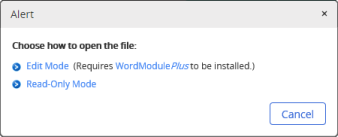
- In the Alert box, Click Edit Mode.
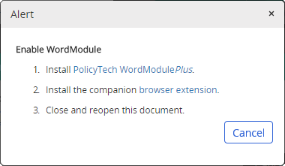
- Click PolicyTech WordModulePlus. A file saves to your Downloads folder.
- From your downloads folder, open the file and follow the prompts to install WordModulePlus.
Note: If you are asked for the user name and password of someone with administrator privileges, then you do not have permission to install software on your computer. Contact your administrator or network administrator for help.
- When the installation is complete, back in the Alert box in the document window, click the browser extension link.
- Click the prompt to add the extension to your browser.
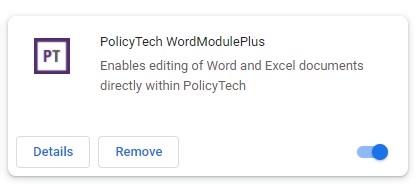
- Close the Policy & Procedure Management document window (the one with the Alert message displayed). When you reopen the document, its contents should immediately display.
 Product Information
Copyright
Product Information
Copyright
This publication was written and produced at NAVEX Global, Inc., Lake Oswego, Oregon. This publication or any portion thereof is confidential and/or proprietary and may not be reproduced or used in any manner whatsoever without the express written permission of NAVEX Global, Inc.
Copyright © 2026 NAVEX Global, Inc. NAVEX Global® is a registered trademark/service mark of NAVEX Global, Inc. The NAVEX Global® logo is a trademark/service mark of NAVEX Global, Inc. Unauthorized use of NAVEX Global, Inc.’s trademarks/service marks is strictly prohibited without prior written permission from NAVEX Global, Inc.